Beginner's guide:
Back to
main
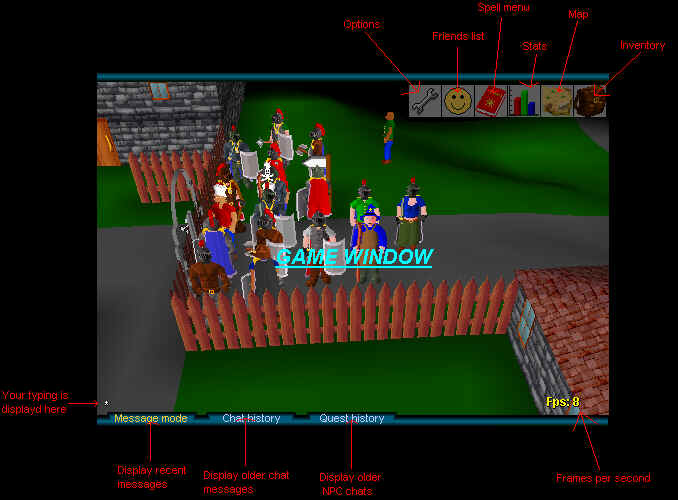
In this guide, you will be thought the basics of all you need to play runescape. In the end of this guidem is section for newbie tips and it is very important to read them, so you wouldn't spoil the fun of experienced players. RuneScape is almost completely played with mouse. The one and only thing to use keyboard is changing camera angle and to chat. To change camera angle, press right or left arrow on keyboard. This should fix problems when you can't see your self. To chat, type anything and it will displayed bottom of the creen and when you press enter, it will be displayed to other players.
To move around in the game, click anywhere on the game window to make your character move there. Your character will always move where you want it to move with two exceptions: 1. There is something blocking your way. You can never walk trough enemies, or even the fighting ones. 2. Click is too far away. If you click on the other side of the river and the only way to get there is from long away, it can't navigate to there.
The game window looks following:
Menus
Below the upper bar is all the menus you need and here is
instructions for how to use them all. All menus can be opened by
putting your mouse cursor over them.
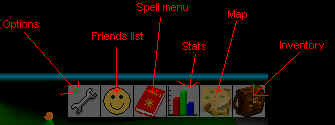
First from left is
Options menu
Options menu contains three options to modify and "log
out" button. 1. options is changing camera behavior from
manual to auto. In manual mode you have complete controll of the
camera and it doesn't change automatically. In auto mode, you
camera can only be directed from 4 different angles, but from
only ones that can see you. Inside any houses or dungeons, you
can choose from 8 different angles, but once again only those can
be used that can see you. Next options is for changing from PK
mode to nonPK mode (or vise verca). This can be only done twice
in the whole game, so think before changing. The change cannot be
done by accident, because the game will ask for confirmations
before changing. Next option is for changing password. This is
more easier than typing "setpass xxxxxxxx" in screen.
Next comes log out button. It is adviced that this is always used
first before closing the browser, because some times you aren't
allowed to log out, but if you log out by closing you browser,
you will be counted as cheater and next time you open the game,
you will start in Lumb Brigde with out any off your stuff.
Second from left is the
friends list
There is not much to tell about the friends list, because it
isn't made ready yet. It will come very soon as the clan support
too.
Third is spell menu
This menu contains all the info about spells and
everything about them. Here is displayed what runes will be
required to cast the spell. There is also descriptions about what
the spell does. To see more information about spells, see the
spells section from the left frame. There is displayed all the
apells of the game with their effects, levels and casting cots.
Fourth is stats
Next comes the stats menu. There is displayed all you
stats and what you gain from your stuff. All stats are displayed
as "A/B", A is your current amount of that
skill (which can be lowered by some effects) and B is your
maximium amount of that skill (this cant be lowered anyway).
There are four scores counted from your stats. See the "Hall
of fame" for more information how the are counted. All
your stats increase when you use them, but you might gain some
skills by completing certain quests.
Second from left is map
This displays near areas around you. This can be used
for movement as well. If you click any where on this map, your
character will move there with 2. exceptions (see above). You can
also see the compass from this window.
And the last is
inventory
Here you can see all you are carrying. Some items have
numbers above them. That means they are stackable items. There is
no limit for stackable items on one pile (but they can't be
divided into more that one pile).